Accessibility
The test player has powerful accessibility features that support a more inclusive testing environment for diverse needs and preferences.
Note
Accessibility features are activated by your site administrator, so not all features may be available to you. Contact your supervisor if you need assistance.
Here's a summary of some of the features available.
Exempt from secure browser
If enabled, you don't need to use the secure browser to take the test. This is useful if you need to use tools that aren't compatible with the lockdown features.
Item substitutions
Test authors can set item substitutions, and the system assigns the substitute item to test-takers allocated a particular code. This covers requirements for audio, visual, or motor assistance. It can also be used to assign items in different languages where relevant.
Zoom tool
The zoom tool lets you zoom into questions. See Zoom tool for details.
Larger font sizes in the rich text editor
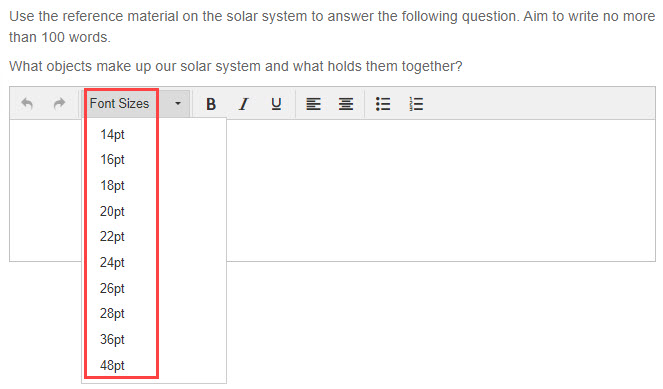
In extended-text question types with the rich text editor enabled, you'd normally have only 14pt and 16pt font sizes available. When this setting is active, you have font sizes of 14, 16, 18, 20, 22, 24, 26, 28, 36, and 48pt.
Test player theme
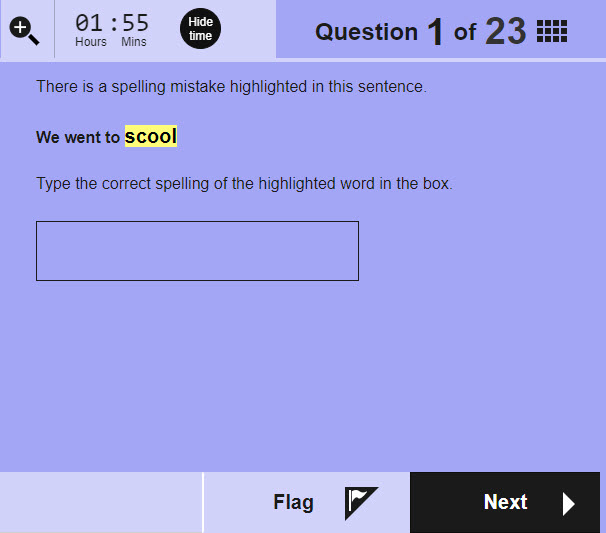
Administrators can use themes to support test-takers needing accommodations — for example, for visual impairments. In this example we've used black text against a lilac background.
What your test administrator controls
All of the features on this page are controlled by your site administrator or test author. If you need a specific feature enabled, ask your supervisor or contact your organisation's administrator before the test.