Navigating a test
You can move between questions in Replay by selecting Next and Back.
Progress summary
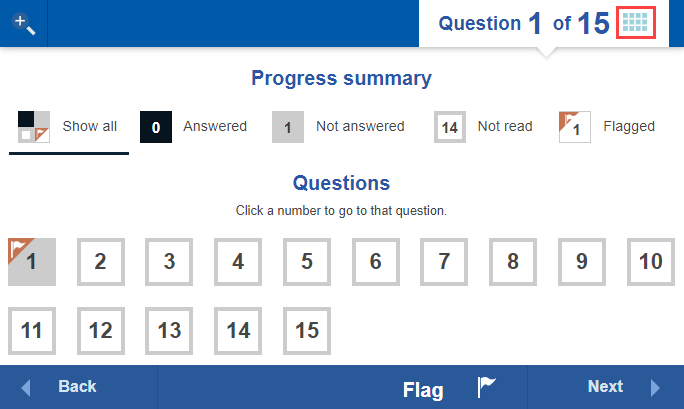
At any time during the test, visit the Progress summary screen to review a summary of your questions. From there you can filter by:
- Answered
- Not answered
- Not read (questions you haven't visited yet)
- Flagged
To open the progress summary, select the progress icon  at the top of any question screen.
You can then select any option to filter the questions. For example, Not answered shows only the questions you haven't responded to.
Flagging questions
If you'd like to come back to a question later in your test, flag it so it's easy to find.
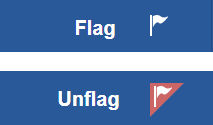
To flag a question, select Flag at the bottom of the question screen. The button changes to Unflag so you can remove the flag.
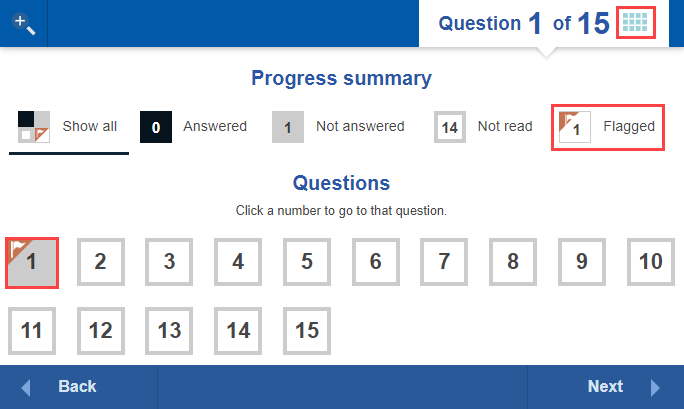
Flagged questions appear on the Progress summary screen. Select a flagged question to jump straight to it.
What your test administrator controls
- Which navigation options are available — some tests allow free navigation between questions, others restrict you to moving forward only.
- Whether the Flag option is shown.