Introduction to design
In this area you create and manage interactive courses, tests, and surveys for both learning and assessment purposes. You create all their components here, organised within topics (disciplines). You can categorise content using tags for sorting and reporting. Templates are used to create screen layouts and interactivity without web development skills.
Learning modules vs assessment modules
Learning and assessment are very different processes, so you create a different kind of module for each.
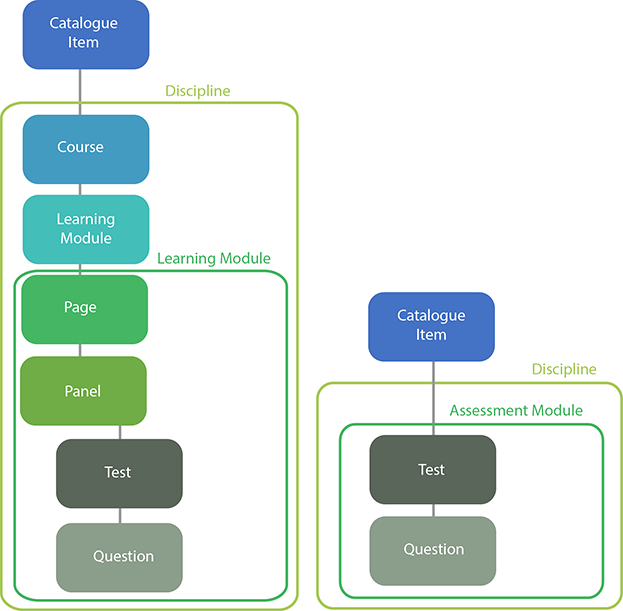
Learning modules are specialised for learning. They're made of pages containing different kinds of panels that can optionally integrate tests and questions to enhance the learning experience.
Assessment modules are focused on assessment and contain no pages or panels. They contain tests and questions and have a much larger range of test options and question types.
The diagrams below show the fundamental structures for both kinds of activities. In both cases users enrol in the catalogue item, and everything else is contained within one discipline.
A catalogue item can be linked to both courses and assessment tests — the system is flexible enough to support learning-only, assessment-only, or both.
Tests
A test is a container for questions. A test can optionally be divided into test sections. Tests and questions all belong to one module and can only be linked within that module (e.g. to pages, tests, questions in the module). The same is true for pages and panels in learning modules.
You create and manage all tests and questions in roughly the same ways. Once the parent module is selected, different options come into play depending on whether the module is Learning or Assessment.
Pages and panels
Pages and panels are only relevant to learning content. In the course player the learner sees and interacts with a series of pages made up of one or more panels designed to enhance learning and integrate tests and questions.
Formal assessment takes place in a test player where the questions, progress, answer submission, and security are paramount.
Surveys
Like tests, surveys are containers for questions — but their purpose is gathering information and feedback rather than assessing. They can be run in either the course player or the test player.
Resources
Resources store images, videos, and other materials that are part of learning and assessment content. Resources belong to a specified module and their usage in questions can be tracked. Each resource is independent of its usage — modifying it updates all its linked questions.
A stimulus contains resources and is only available in assessment modules. It functions in assessment questions as an additional piece of information that slides on and off the question screen at the candidate's command.
Tags and tag types
Tags and tag types sort, organise, and locate all the content above (except pages and panels). They play an analogous role to groups and group types in user management.
Templates
Templates are outside the tag system and available in any discipline. They're used for:
- Page layouts (configurations of multiple panels)
- Panel types (static, dynamic, interactive, and question-based panels)
- Layout of catalogue items on screen
Topics in this area
- Tests
- Assessment Modules
- Assessment module tests
- Assessment module questions
- Assessment question types
- Custom Pages Modules
- Learning courses
- Learning Modules
- Learning module panels
- Learning module tests
- Test panels in learning modules
- Question and Test Interoperability (QTI)
- Resources
- Assessment stimuli
- Surveys
- Templates