Software versioning
Software versioning assigns unique version numbers to states of an entity. Versions are made up of major and minor components — the major version is to the left of the decimal place, the minor to the right. For example, 1.53 has a major version of 1 and a minor version of 53.
- An entity starts at version
0.01when first created or imported. - Every time an entity is saved, the minor version number increases by
0.01. - Modifications to metadata increase the minor version by
0.01every time a metadata set is saved. - If the minor version reaches
.99the increment changes to0.001. If it reaches.999, the increment changes to0.0001. - When an entity transitions to the Management Review workflow state, the major version increases by 1 and the minor resets to zero (
0.55becomes1.00).
Note
If a resource or stimulus that belongs to a question is updated, the version number of the question doesn't automatically update.
Versioning can be applied to:
- Questions
- Stimuli
- Resources
- Tests
| Trigger | Version change |
|---|---|
| New entity created or imported | Begins at 0.01 |
| Entity saved | Minor version increases by 0.01 |
| Workflow transitions from Draft, Internal Review, Requires Modification, or Modification Review to Management Review | Version increases by 1.0 |
Enable versioning
Versioning becomes available on the entity's details page only if enabled in Settings.
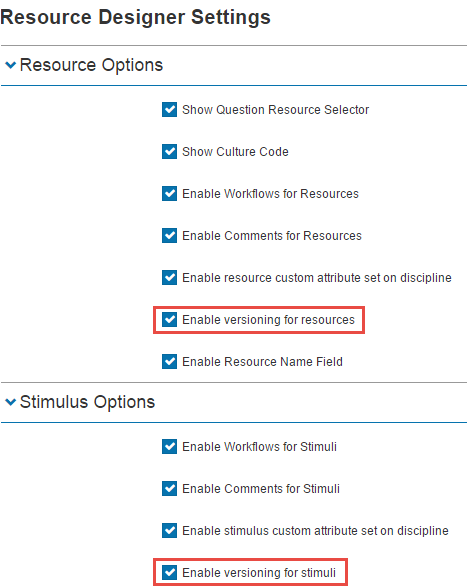
Versioning for resources and stimuli
Navigate to Settings > Resource Settings and open either the Resource Options or Stimulus Options subsection.
- Check Enable versioning for resources / stimuli.
- Select Save Resource Designer Settings.
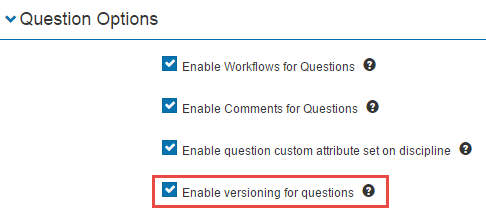
Versioning for tests and questions
Navigate to Settings > Test Designer Settings and open either the Test Options or Question Options subsection.
- Check Enable versioning for questions / tests.
- Select Save Test Designer Settings.

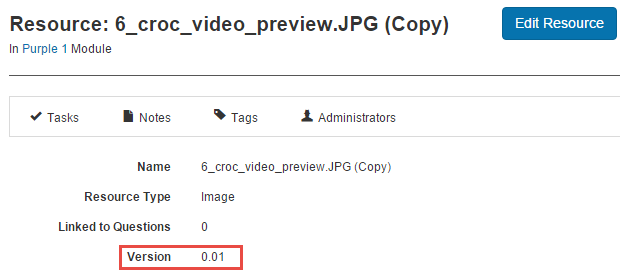
View the version number
To view the version number, navigate to the entity's details page. Below is an example on a resource.
Settings
This page documents the versioning checkboxes that live under both Settings > Resource Settings (Resource Options and Stimulus Options subsections) and Settings > Test Designer Settings (Test Options and Question Options subsections).
Related settings:
Resource Designer (Settings > Resource Settings) — see Resource designer.
Test Designer (Settings > Test Designer Settings) — see Test designer.