UserVoice
The UserVoice plugin can be integrated with Janison Academy to create a valuable feedback tool for the platform. It:
- Lets users suggest and collaborate on ideas.
- Collects and organises feedback from multiple sources.
- Provides a clear and actionable view of user feedback.
- Enables Janison Academy product development to adapt to your users' needs.
How does UserVoice work?
Administrators can submit new ideas for Janison Academy via a widget within the platform. Ideas are captured on the Janison Learning forum hosted by UserVoice, where users can review, support, comment on, and subscribe to ideas.
Enabling UserVoice
Contact your Janison project or support team. They can enable the UserVoice plugin and set up the required permissions and menu items.
Configure UserVoice
Tenant administrators can configure the style and default options of UserVoice. Settings can be configured per sub-domain if those are used.
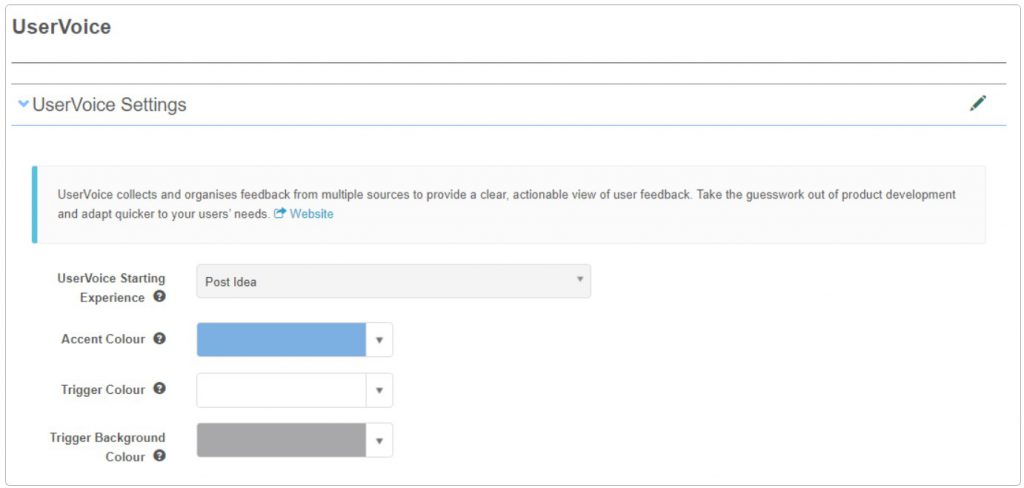
- Navigate to Settings > UserVoice Settings.
- The UserVoice screen displays. Select the edit icon next to UserVoice Settings to enable editing.
-
Customise the following settings:
-
UserVoice Starting Experience — what users see by default when they select the trigger and the widget opens.
Note
While both Post Idea and Smart Vote are visible in this menu, only Post Idea is currently active. Even if Smart Vote is selected, the starting experience will still be Post Idea. Smart Vote is to be included in a future release.
-
Accent Colour — the colour of the accents on the widget.
- Trigger Colour — the colour of the trigger icon that users select to open the widget.
- Trigger Background Colour — the background colour of the trigger.
-
-
Select Save.
Using UserVoice
Once UserVoice is enabled, users see a lightbulb icon in the top right of the user interface, next to their user profile details. The trigger style can be configured by the tenant administrator.
Selecting the trigger opens the UserVoice widget, where the user can submit an idea by:
- Describing their idea.
- Optionally including a relevant attachment.
- Optionally reviewing existing topics reported by the widget that are similar to their idea's description, including the option to subscribe to topics.
Settings
Administrators can configure the following settings at Settings > UserVoice Settings.
UserVoice Starting Experience — sets which widget view (Post Idea / Smart Vote) opens by default. Currently only Post Idea is active.
Accent Colour — colour of accents on the widget.
Trigger Colour — colour of the lightbulb trigger icon.
Trigger Background Colour — background colour of the trigger.