Terms of Use
The Terms of Use feature ensures that users accept terms before they can use the site.
Enable self-registration
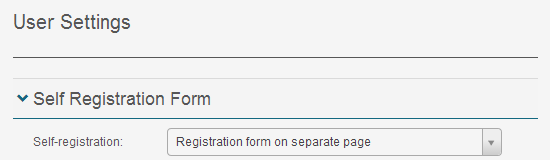
To make this feature available, enable self-registration.
-
Navigate to Settings > User Settings.

-
Open the Self-Registration Form section.
-
From the Self-Registration dropdown, choose Registration form on a separate page.
-
Save your settings.
Set up Terms of Use
- Navigate to Settings > Terms of Use.
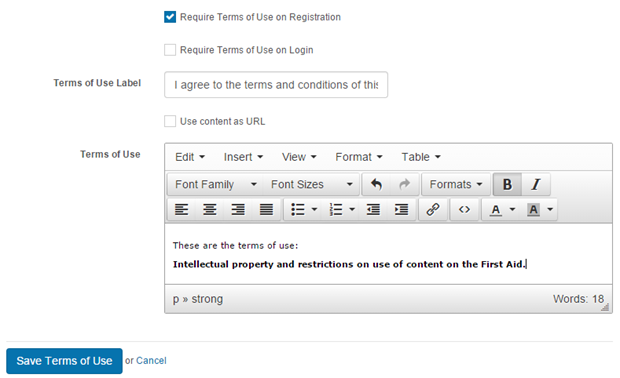
- Check Require Terms of Use on Registration.
- Set your Terms of Use Label — this is what users see when registering.
-
Enter the text you want to appear for the user to accept in the Terms of Use editor.
-
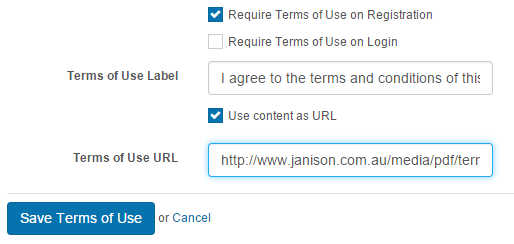
The Terms of Use URL overrides the description at the bottom. Use the URL if you already have a Terms of Use page on another website (PDFs with URLs can also be linked).
-
Save your changes.
End user experience
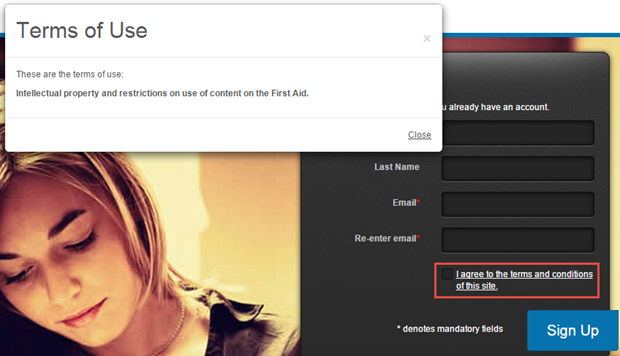
A link appears on the registration form of the site login page. The text reflects the Terms of Use Label. A popup appears when the link is selected. The user must check the box — without doing so they aren't permitted to access the site.
Settings
This page is itself the Settings documentation for Terms of Use. All operations are at Settings > Terms of Use.
Related settings:
User Settings (Settings > User Settings) — the Self-Registration Form option must be enabled before Terms of Use applies.