Introduction to authoring
In the Insights authoring area, you create your tests. The system is organised into a set of nested entities, letting you structure your content into specific topics. This design streamlines test management as you develop and organise your assessments.
Note
Janison tests and many items are QTI 2.1 compliant.
The diagram below shows how the entities fit together. In this example there is one discipline and two modules: the first module has two tests and the second has one. Further down, we've applied this structure to a real-world example.
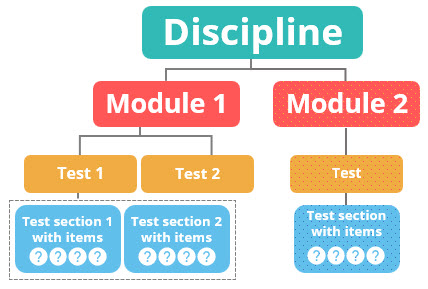
- Discipline – the top level, used to organise your modules into topics such as science, maths or history. You can create as many disciplines as you need. Read more in Disciplines.
- Module – the second level, used to group a discipline into sub-topics — for example biology and physics within a science discipline. Read more in Modules.
- Test – the third level, used to organise the tests within a module, such as ecology and evolution biology tests. Read more in Create a test.
- Test section – the fourth level, used to organise a test into further sub-topics, such as applied ecology and Arctic sea ice ecology. Read more in Test sections.
- Items – you add items to test sections. Items may contain stimuli that provide additional information or context to the test-taker. Read more in Items.
This is an example of how you could use the structure to organise science topics.
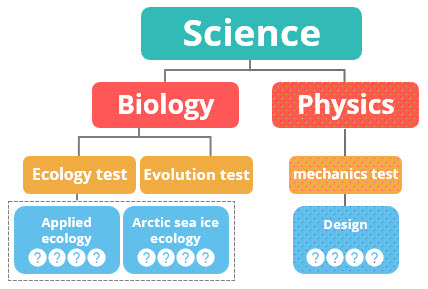
You create and manage these entities from the Author menu.
Note
Janison Insights is customisable, so your entities may have been renamed and the menus adjusted for your site.
Settings
Administrators can rename entities and other labels at Settings > String Resources, or apply preferred terminology in bulk at Settings > Naming Conventions.
String Resources — override the default names of entities (disciplines, modules, tests, test sections and items) and other UI labels throughout the platform.
Naming Conventions — define preferred terminology and the string resources it should replace across the platform in a single action.