Introduction to people management
The People area is where you manage users and organise them into a structure that suits your organisation's needs. This structure is built on a hierarchy of Organisations and Organisation Units, with additional flexibility provided by Groups.
What's in the people area
- Users and test-takers — the individuals who access the system. Each user is assigned to an organisation and an organisation unit.
- Roles — define what each user can access and do in the system.
- Organisations and organisation units — the top-level entities in your organisational hierarchy, and the subdivisions within them (such as faculties or departments).
- Groups and Group Types — flexible cohorts that can draw members from across the hierarchy.
- Announcements — send messages to users or groups.
- Assessment venues — locations where assessments are delivered.
- People directory — a searchable directory of users' public profiles.
- Positions — a positions-based structure for relationship management (available when enabled by an administrator).
The organisational hierarchy vs. groups
While the organisational hierarchy provides a top-down structure (e.g., faculties and departments), Groups offer a flexible way to categorise users across this structure. Groups allow you to form cohorts or working teams that can transcend departments or even exist completely outside the formal hierarchy.
Riverside Uni example
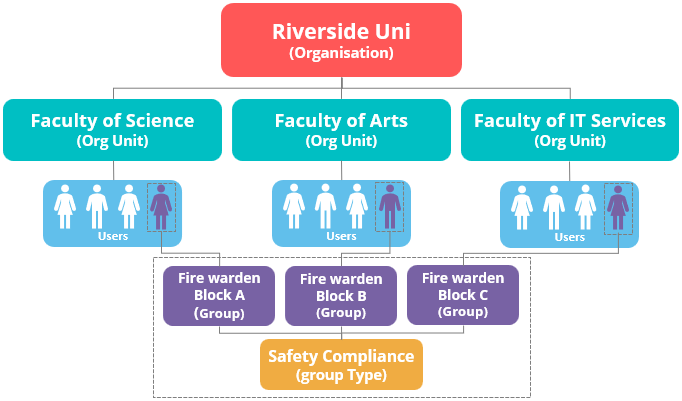
The diagram below illustrates how these components work together at Riverside Uni.
- Organisational hierarchy: Riverside Uni is the top-level Organisation, with three Organisation Units below it: the Faculty of Science, Faculty of Arts, and Faculty of IT Services. Each faculty contains a number of users.
- Groups: The diagram shows that users from all three faculties are members of a specialised Group Type called Safety Compliance. Within this type, there are three specific Groups: "Fire warden Block A," "Fire warden Block B," and "Fire warden Block C." This shows how groups can draw members from across the hierarchy to serve a specific purpose.
Settings
There are no settings that affect the People area as a whole. Configuration options for individual features are documented on their respective pages.