Event Hub & Service Bus Integration
Test delivery messaging
Janison uses Microsoft Azure Event Hub & Microsoft Azure Service Bus integration to deliver document workflow state transitions to our clients as third-party consumers.
For additional context, visit the Microsoft product documentation.
Important
To use these services please contact your Janison account manager to assist with the setup requirements.
Types of messaging
Two message categories are available:
- Document workflow state transitions
- Test delivery messages
Messages are sent when:
- Taking a test
- Workflow state changes (if configured)
Configure Event Hub and/or Service Bus
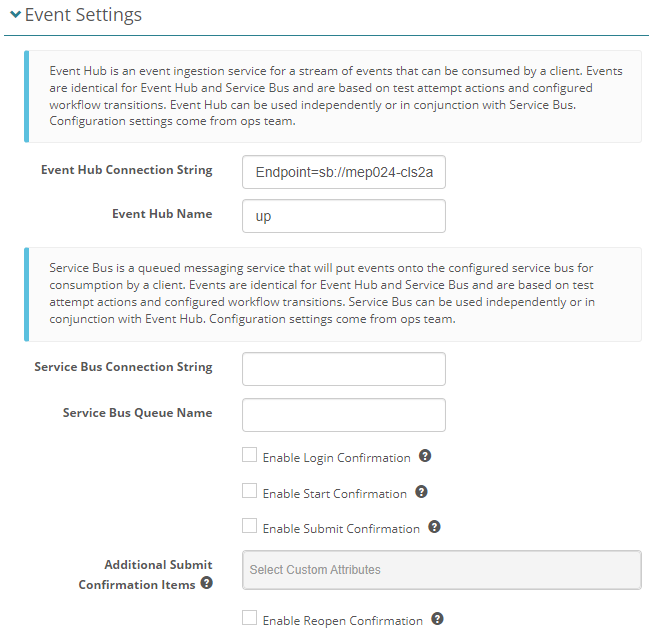
Navigate to Settings > Tenant Settings and open the Event Settings expandable. The following configuration settings are an example of how this could look.
Note
The Janison operations team will provide the configuration settings for this page.
Service Bus can be used independently or in conjunction with Event Hub and vice versa.
Azure Event Hub
Azure Event Hub is a big data streaming platform and event ingestion service.
Azure Service Bus
Azure Service Bus is a fully managed enterprise message broker with message queues and publish-subscribe topics.
Document workflow state transitions
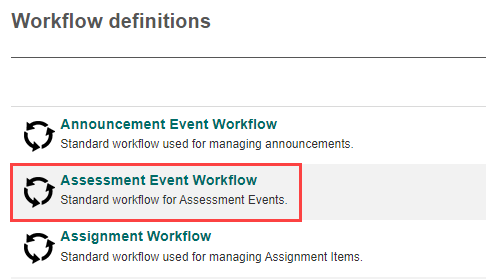
You will need to activate these options at the global tenant level. Navigate to Settings > Workflow definitions.
Select the relevant workflow. In the below example, we've selected the Assessment Event Workflow.
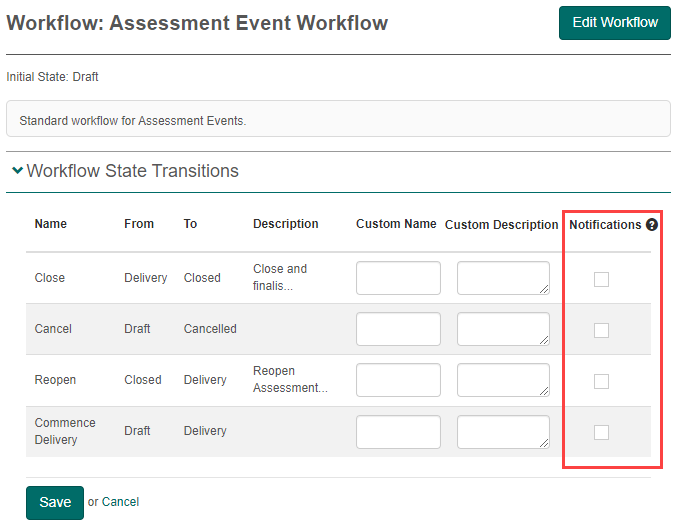
For any tenant that has an Event Hub and/or Service Bus connection configured, to enable the options, go into edit mode and make your selections in the Notifications column and Save.
Workflow state transition event messages have the following structure:
{
  "Id": "54283202-1004-4D32-B730-9F28E4F8C238",
  "Entity": "AssessmentEvent",
  "Event": "DocumentStateTransition",
  "TransitionFrom": "Draft",
  "TransitionTo": "Delivery",
  "TransitionName": "Commence Delivery"
}
Workflow State Transition Payload Definition
| Property | Description |
|---|---|
| Id | string (36). System assigned unique identifier |
| Entity | string (128). Entity type name from workflow definitions |
| Event | string (64). Always 'DocumentStateTransition' |
| TransitionFrom | string (128). Previous workflow state |
| TransitionTo | string (128). New workflow state |
| TransitionName | string (128). Transition name |
Test delivery messages
Admins can configure test delivery messages to send notifications at a tenant level. Navigate to Settings > Tenant Settings.
Open the Event Settings expandable to view the available notifications.
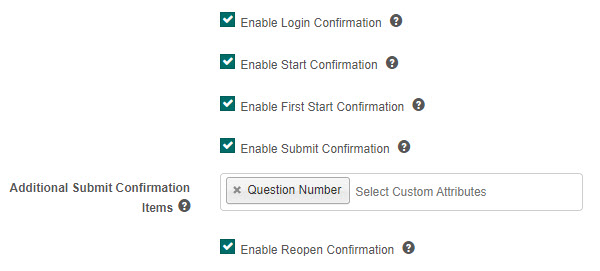
Any tenant that has an event hub and/or service bus connection configured will send messages based on the following available options:
Enable Login Confirmation – If this is enabled, a 'login' confirmation will be included in the event message when a user confirms their identity upon login.
Enable Start Confirmation – If this is enabled, a 'start' confirmation will be included in the event message when a user enters the main body of a test for the first time.
Enable First Start Confirmation – A message is sent when main body of a test is entered for the first time. Whilst similar to start, this is only sent once per assessment event enrolment.
Enable Submit Confirmation – If this is enabled, a 'submit' confirmation will be included in the event message when an attempt is submitted by the user or admin.
Additional Submit Confirmation Items – If added here, item custom attributes can be included in the 'submit' confirmation messages when an attempt is submitted by the user or admin.
Note
To be available for the selection, custom attributes need to be linked directly to the item and be one of the following types: boolean, integer, float, string, list, date.
Enable Reopen Confirmation – If this is enabled, a 'reopen' confirmation will be included in the event message when an attempt is reopened by the user or admin.
Login, Start, and Reopen Message Format
Payload Definition (Login, Start, Reopen)
| Property | Description |
|---|---|
| Id | string (36). System assigned unique identifier of test attempt |
| Entity | string (64). Always 'TestAttempt' for test delivery messages |
| Event | string |