Quality controls
Enrolment-based marking includes optional quality control features to help ensure accurate and reliable marking. These controls are configured before marking begins.
Seed scripts
Seed scripts are test-taker responses that chief markers pre-mark before live marking starts. The system distributes these into markers' queues as checks — markers see them as regular scripts, without knowing they've been pre-marked.
Important
The mark the chief marker assigns to a seed script is the mark that contributes to the test-taker's final result, not the marker's score.

Configure seed scripts
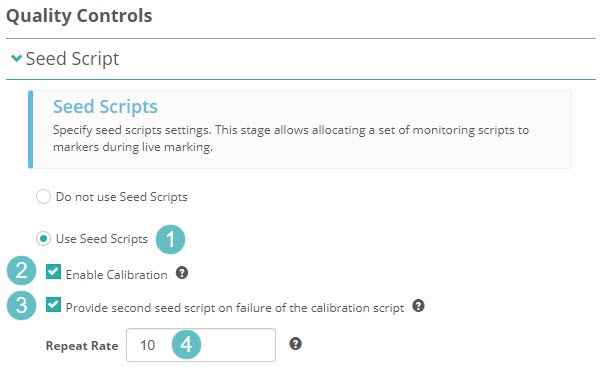
- In the Quality Controls section of the marking project, select the pencil icon on the Seed Script expandable.
- Select Use Seed Scripts.
- Optionally enable Calibration — this provides each marker with a seed script as the first script of their day.
- Optionally select Provide second seed script on failure of calibration — sends a second seed script if the marker fails the first.
- Enter a Repeat Rate — for example, entering
10means one seed script will appear for every 10 scripts a marker marks. -
Select Save.
Tolerance settings
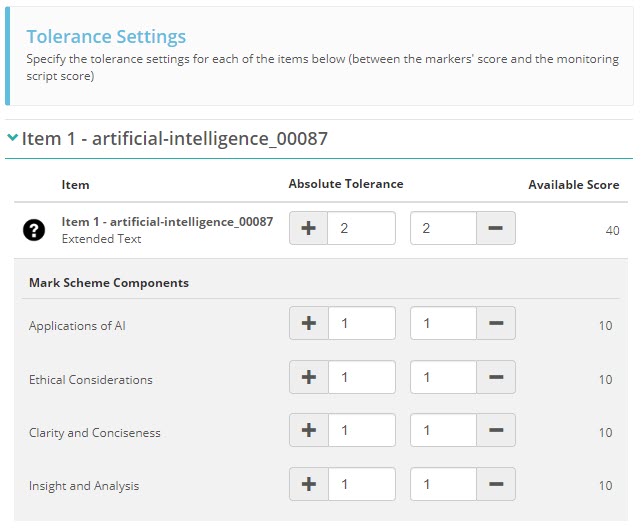
Tolerance defines how much a marker's score can deviate from the chief marker's seed script score before it's flagged as out-of-tolerance. You set tolerance per item or per marking scheme component.
For example, an absolute tolerance of ±2 means any marker score that differs from the seed script score by more than 2 points will fail the quality check.
Notification settings
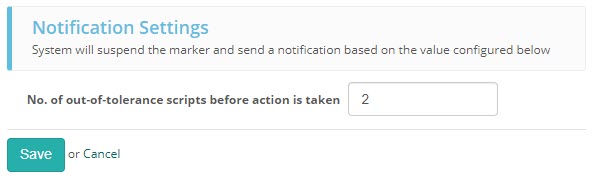
When a marker exceeds the out-of-tolerance threshold you set, they are suspended from marking and receive an email notification.
Configure the suspension threshold — for example, set it to 2 to suspend a marker after two out-of-tolerance seed scripts.