Copy a test
The copy feature duplicates an existing test. You choose how much to copy — from a lightweight copy that reuses the original's content, through to a fully independent copy of the test and everything in it.
Copy options
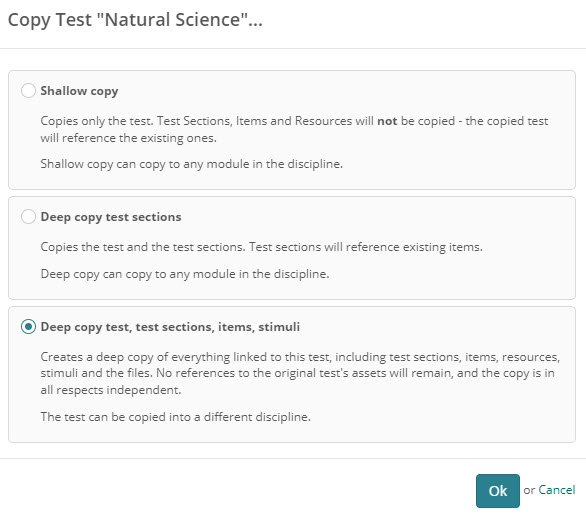
When you copy a test, you choose one of the following copy types.
Shallow copy — copies the test only. Test sections, items, and resources are not copied; the new test references the originals. The copy stays in the same discipline. Unless Enable cross-module sections and items is enabled, it must also stay in the same module as the original.
Deep copy test sections — copies the test and its test sections. The copied test sections still reference the existing items rather than creating new ones. The copy stays in the same discipline. This option appears only when the test uses test sections.
Deep copy test, test sections, items, stimuli — copies everything linked to the test: test sections, items, resources, stimuli, and files. The copy has no dependencies on the original test's assets, and can be created in a different discipline. (If the test has no test sections, this option is labelled Deep copy test, items, stimuli.)
Making a copy
Copying a test requires the appropriate role permission. If Copy Test… isn't in your Actions dropdown, your role doesn't have it (see Settings).
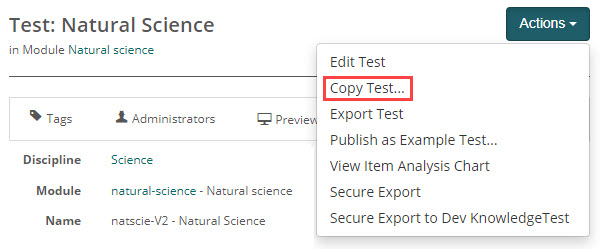
Open the test you want to duplicate, then select Copy Test… from the Actions dropdown.
In the Copy Test modal, select a copy type, then select Ok.
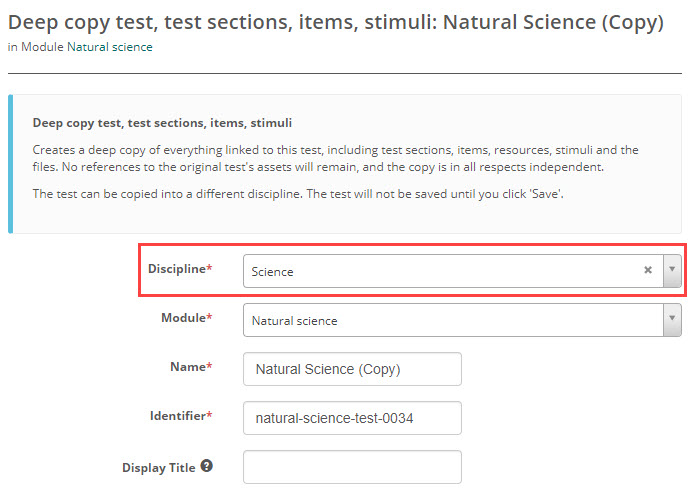
Selecting Ok opens the copy in the test edit form, pre-filled from the original. Set the Discipline (available only for the full Deep copy test, test sections, items, stimuli option), Module, Name, and Identifier, and adjust any test settings. Nothing is copied until you save. For a description of the fields on this form, see Create a test.
Select Save Test to create the copy. It's then ready for editing or publication.
Settings
Administrators can configure the following setting at Settings > Test Designer Settings.
Enable cross-module sections and items — when enabled, a Shallow copy or Deep copy test sections can be copied to any module within the same discipline. When disabled (the default), these copies must stay in the same module as the original test. This setting does not affect the full Deep copy test, test sections, items, stimuli option, which can always be copied to a different module or discipline.
Copying a test also requires the appropriate role permission. Some roles — for example, the Catalogue Approver roles — are denied the copy action by default, so Copy Test… won't appear in their Actions dropdown.