Marking teams
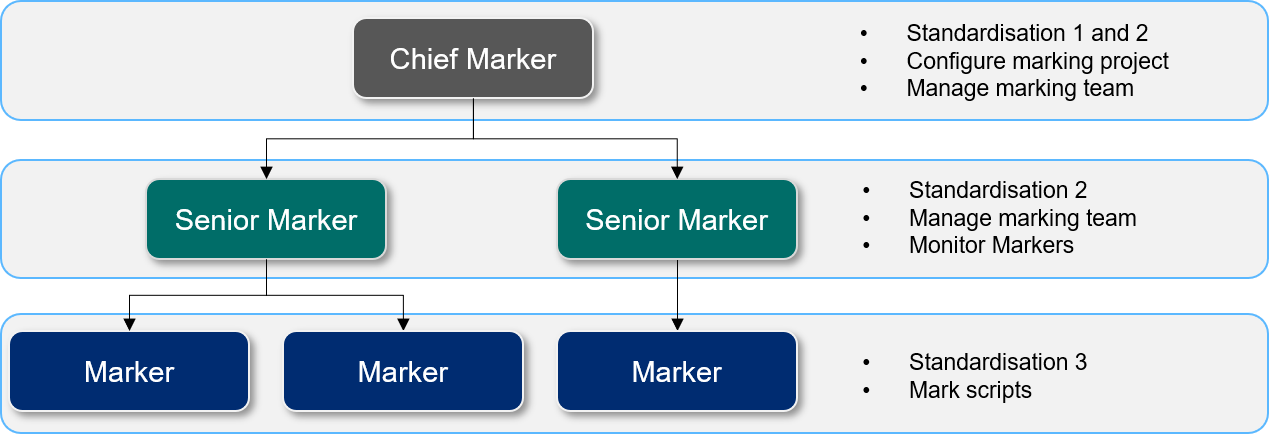
Janison Insights can be used to form marking teams to mark a number of marking projects for a certain module. Teams typically consist of Chief Markers, Senior Markers and Markers.
Markers with these different levels of authority have system roles assigned to them which are relevant to the activities they are authorised to do. These roles control the tasks they can undertake by only making the relevant links and buttons available to them.
Important
These roles are configurable, so can be customised to suit your requirements. This is done in Settings > Roles.
Below is an example of a simple marking team structure. In bigger organisations, there could be dozens of Markers assigned to each level.
Work allocation tools allow you to assign specific individual questions to teams or Markers. For example, team A may be responsible for marking questions 1–10, while team B is responsible for marking questions 10–20.
Markers can access tools such as the ability to escalate a candidate's response to a Senior Marker. The Senior Marker can then see this action on their dashboard and respond to the marker or add their own score.