Application Programming Interface (API) framework
The Janison API framework is a mechanism that enables Janison Insights to communicate with your internal systems, for example, your HR system.
Janison has API frameworks available for:
- Users
- Events
- Authoring
Important
Times presented in the APIs will be listed as Coordinated Universal Time (UTC) unless specified otherwise.
Swagger descriptions
Select the tiles below to view the descriptions of the APIs in Swagger.
Setup requirements
If you are interested in our API framework, please contact your Janison account manager.
The Janison operations team will set up your access from the Janison side. Your account manager will provide you with the following details required by your technical team to access the framework:
- Client Id
- Tenant Id
- Scope
- Subscription Key
- API Endpoint Url
- Certificate
Demo code
To use the following .NET C# code example:
- Import the provided certificate
- Install the
Microsoft.Identity.ClientNuGet package - Install the
System.Runtime.CachingNuGet package - Install the
System.Security.Cryptography.X509CertificatesNuGet package - Update
clientId,tenantId,scopes,subscriptionKeyandapimEndpointUrlwith values provided
using Microsoft.Identity.Client;
using System;
using System.Net.Http;
using System.Net.Http.Headers;
using System.Security.Cryptography.X509Certificates;
using System.Threading.Tasks;
using System.Runtime.Caching;

class Program
{
    // Cache to store the access token
    static MemoryCache tokenCache = new MemoryCache("TokenCache");

    static async Task Main(string[] args)
    {
        // Azure AD and MSAL configuration
        string clientId = "your-client-id"; // Replace with your Azure AD application's client ID
        var tenantId = "your-tenant-id"; // Replace with your Azure AD tenant ID
        string authority = $"https://login.microsoftonline.com/{tenantId}"; // Replace with your Azure AD tenant ID
        string[] scopes = { "your-scope" }; // Replace with the required scopes
        string subscriptionKey = "your-subscription-key"; // Replace with your subscription key
        var apimEndpointUrl = "your-api-endpoint-url"; // Replace with your Azure APIM endpoint URL
        var certificateThumbprint = "your-certificate-thumbprint"; // Replace with your certificate thumbprint
        string cacheKey = $"{clientId}-acquired-token"; // Key used to cache the access token

        // Azure APIM API endpoint URL - users list
        string apiEndpointUrl = $"{apimEndpointUrl}/users/v2/users"; // Replace with your API endpoint URL

        // Get the certificate from the certificate store
        var cert = GetCertificateFromStore(certificateThumbprint);
        if (cert == null)
        {
            Console.WriteLine("Certificate not found in the store");
            Console.ReadLine();
            return;
        }

        // Create a confidential client application
        var app = ConfidentialClientApplicationBuilder.Create(clientId)
            .WithAuthority(new Uri(authority))
            .WithCertificate(cert)
            .Build();

        // Acquire a token from cache if available
        string accessToken = GetCachedAccessToken(cacheKey);
        // If the access token is not available in cache, acquire a new one
        if (string.IsNullOrEmpty(accessToken))
        {
            var result = await app.AcquireTokenForClient(scopes).ExecuteAsync();
            accessToken = result.AccessToken;
            // Cache the access token until its expiration time
            CacheAccessToken(cacheKey, accessToken, result.ExpiresOn);
        }

        // Use the obtained bearer token in the HttpClient
        using (HttpClient client = new HttpClient())
        {
            // Add the access token to the Authorization header of the API request
            client.DefaultRequestHeaders.Authorization = new AuthenticationHeaderValue("Bearer", accessToken);
            // Add the subscription key to the Ocp-Apim-Subscription-Key header of the API request
            client.DefaultRequestHeaders.Add("Ocp-Apim-Subscription-Key", subscriptionKey);

            try
            {
                // Send a GET request to the API endpoint
                HttpResponseMessage response = await client.GetAsync(apiEndpointUrl);

                // Check if the response is successful
                if (response.IsSuccessStatusCode)
                {
                    // Read the response content as a string
                    string responseBody = await response.Content.ReadAsStringAsync();

                    // Parse and process the JSON response
                    // Here, you can deserialize the JSON response into your User model
                    // and perform further processing on the data
                    Console.WriteLine("API Response:");
                    Console.WriteLine(responseBody);
                }
                else
                {
                    Console.WriteLine($"HTTP Error: {response.StatusCode} - {response.ReasonPhrase}");
                }
            }
            catch (HttpRequestException ex)
            {
                Console.WriteLine($"HTTP Request Error: {ex.Message}");
            }
        }
        Console.ReadLine();
    }

    static X509Certificate2 GetCertificateFromStore(string thumbprint, StoreName storeName = StoreName.My, StoreLocation storeLocation = StoreLocation.CurrentUser)
    {
        X509Certificate2 certificate = null;

        // Open the specified certificate store in read-only mode
        using (X509Store store = new X509Store(storeName, storeLocation))
        {
            store.Open(OpenFlags.ReadOnly);

            // Find the certificate by its thumbprint
            X509Certificate2Collection certCollection = store.Certificates.Find(X509FindType.FindByThumbprint, thumbprint, false);

            if (certCollection.Count > 0)
            {
                certificate = certCollection[0];
            }

            store.Close();
        }

        return certificate;
    }

    static string GetCachedAccessToken(string cacheKey)
    {
        if (tokenCache.Contains(cacheKey))
        {
            return tokenCache.Get(cacheKey) as string;
        }
        return null;
    }

    static void CacheAccessToken(string cacheKey, string accessToken, DateTimeOffset expiration)
    {
        var cacheItemPolicy = new CacheItemPolicy
        {
            AbsoluteExpiration = expiration
        };
        tokenCache.Set(cacheKey, accessToken, cacheItemPolicy);
    }
}
Settings
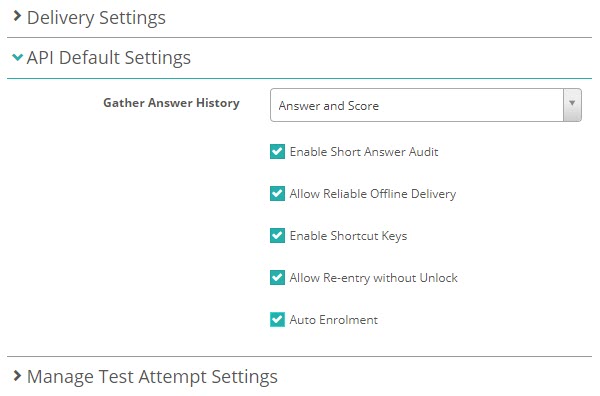
The API Default Settings are available in the Assessment Event Settings page.
Navigate to Settings > Assessment Event Settings and expand API Default Settings.