General settings
The Settings section enables customisation of both the appearance and functionality of your system, according to your requirements and preferences.
Find a setting fast
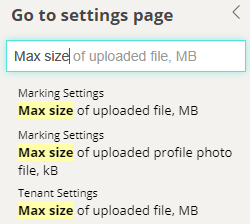
To quickly locate a setting, press Alt+S and type your search words. In this example we're looking for places where you can set maximum file size limits.
Numerous customisation options abound, and the following represent just a glimpse of the possibilities:
- The identity of your site, including colour schemes and typography
- Items that display on the menu and the terminology used for these
- Password complexity
- The content of email notifications
- Permission levels for roles
The Janison team will make most of the configuration changes in this area when your system is implemented.
In this section
- Custom attributes — define additional data fields, group them into sets, and batch edit their values
- Custom attribute types — reference for every attribute type, with examples of how each displays
- Create custom attributes — step-by-step creation instructions for each type
- Password settings — complexity rules, generation, expiry, reveal and reuse policies
- QuickAdd User — configure the quick user-creation form
- Schedule a job — run reports, imports and other jobs at set times or intervals
- String resources — customise system text, terminology and translations
- Style and images — brand your site with colours, logos and custom CSS
- User settings — configure user forms, views, self-registration and defaults
- Workflows — approval processes for tests, questions, resources and stimuli
For connecting Janison Insights to other systems, see the introduction to integration.